KDE Partition Manager
KDE Partition Manager is a powerful and feature-rich graphical disk and partition management tool developed as part of the KDE software suite. It provides a comprehensive set of tools for creating, deleting, resizing, moving, copying, and formatting disk partitions on local hard drives, solid-state drives, and removable storage devices. Within the Active@ LiveCD environment, KDE Partition Manager serves as a fully featured alternative to GParted, offering a slightly different interface and workflow that some users may find more intuitive, while providing an equivalent level of functionality and file system support.
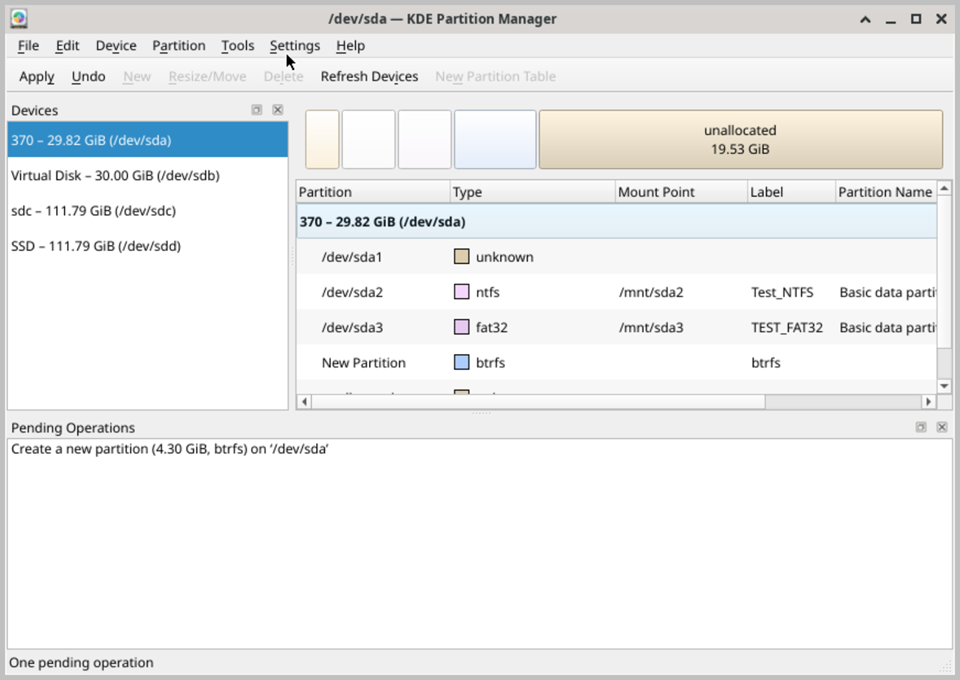
The main interface is divided into three key areas. At the top of the window, a graphical representation of all detected physical drives and their partition layouts provides an immediate visual overview of how storage space is organized across each device. The central area displays a detailed tree view of all drives and their partitions, showing key information such as partition name, file system type, total size, used and free space, mount point, and partition flags. A properties panel at the bottom of the window displays additional technical details about the currently selected drive or partition, providing deeper insight into the device characteristics and partition attributes.
KDE Partition Manager supports a comprehensive range of file system types, including NTFS, FAT16, FAT32, exFAT, ext2, ext3, ext4, XFS, Btrfs, ReiserFS, and many others, ensuring broad compatibility with drives formatted for Windows, Linux, and other operating systems. Partitions can be resized and moved non-destructively, provided sufficient unallocated space is available on the drive, making it possible to redistribute storage capacity between existing partitions without data loss. New partitions can be created in any available unallocated space and formatted with a chosen file system type during the creation process.
A particularly useful feature of KDE Partition Manager is its support for advanced storage configurations, including RAID arrays, LVM (Logical Volume Manager) volumes, and encrypted LUKS partitions. This makes it suitable not only for standard partition management tasks but also for working with more complex storage setups commonly found in server and enterprise environments. The ability to manage these advanced configurations from within the Active@ LiveCD environment is especially valuable when the host system is unavailable or unbootable.
Like GParted, KDE Partition Manager applies all partition operations in a queued, transactional manner. Planned changes are added to a pending operations list and are not written to disk until you explicitly choose to apply them. This approach allows you to carefully plan and review a sequence of partition operations before committing any changes, minimizing the risk of accidental data loss. A detailed operation log is displayed during execution, providing clear feedback on the progress and outcome of each individual operation as it is applied to the disk.