GParted Partition Editor
GParted (GNOME Partition Editor) is a powerful and widely used open-source graphical partition management tool that allows you to create, delete, resize, move, format, and manage disk partitions on local hard drives, solid-state drives, and removable storage devices. Within the Active@ LiveCD environment, GParted serves as one of the primary tools for disk preparation, partition management, and storage configuration, providing a comprehensive and reliable solution for virtually any partition-related task without the need for command-line expertise.
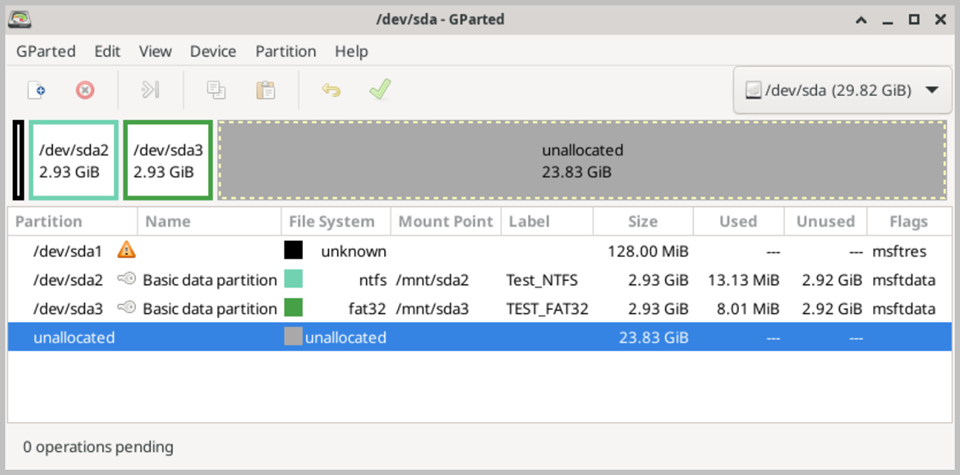
The main interface displays a graphical representation of all detected physical drives and their partition layouts at the top of the window, providing an immediate and clear visual overview of how each drive is organized. Below the graphical view, a detailed list displays all partitions on the currently selected drive, along with key information such as partition name, file system type, size, used and free space, and partition flags. This combination of visual and tabular information makes it easy to understand the current state of any drive at a glance and plan partition operations accordingly.
GParted supports a wide range of file system types, including NTFS, FAT16, FAT32, exFAT, ext2, ext3, ext4, XFS, Btrfs, and many others, ensuring compatibility with drives formatted for Windows, Linux, and other operating systems. Partitions can be resized and moved without data loss, provided sufficient free space is available, making GParted an invaluable tool for redistributing storage space between partitions on a drive that cannot be taken offline under its native operating system. New partitions can be created in any available unallocated space, and existing partitions can be formatted with a chosen file system type as part of the creation process.
One of the key advantages of using GParted within the Active@ LiveCD environment is that it operates completely independently of the host operating system. This means that system partitions, including the Windows boot partition and other volumes that would normally be locked and inaccessible during regular operation, can be freely modified without restriction. This independence is essential for tasks such as resizing a system partition, recovering unallocated space, repairing a corrupted partition table, or preparing a drive for a fresh operating system installation.
GParted applies all partition operations in a queued, transactional manner. Changes you make in the interface are not applied immediately to the disk — instead, they are added to a pending operations queue that is displayed at the bottom of the window. This allows you to plan and review a sequence of multiple partition operations before committing any of them to disk, reducing the risk of errors and giving you the opportunity to cancel or modify the planned operations before any data is written. Once you are satisfied with the planned changes, clicking the Apply button executes all pending operations in sequence.