Application Finder
Application Finder is a lightweight and convenient utility that provides a quick and easy way to locate and launch any application installed on the Active@ LiveCD system without the need to navigate through the Start menu hierarchy. It is particularly useful when you know the name of the application you want to open but prefer not to browse through multiple menu categories to find it, making it a time-saving tool for users who work frequently with a variety of different utilities and applications.
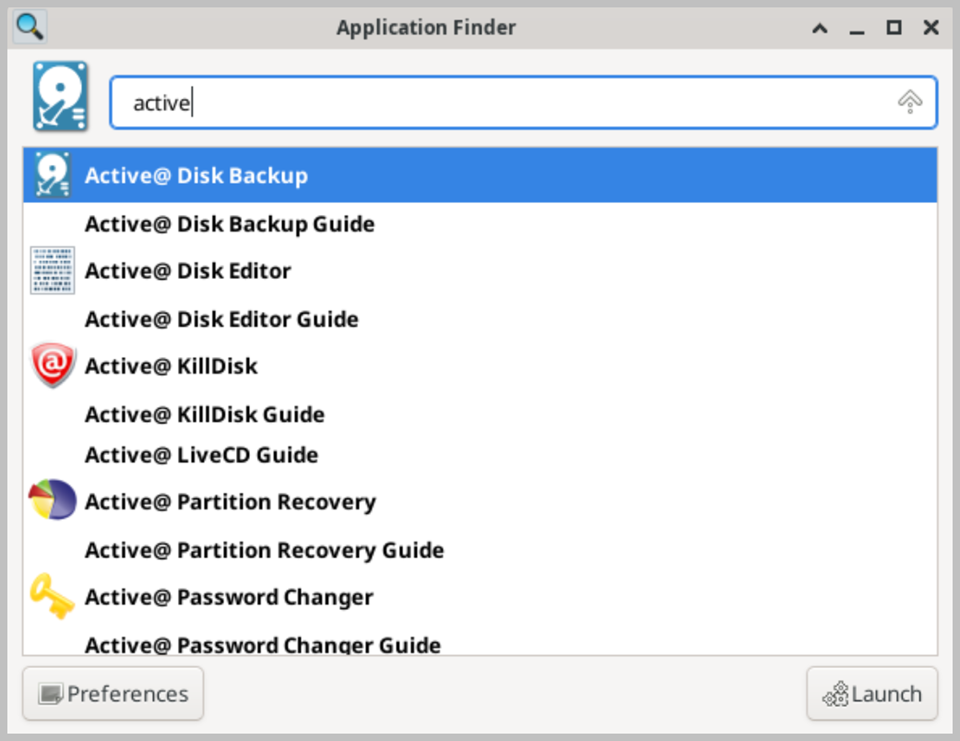
The application can be launched from the Start menu or activated using a configurable keyboard shortcut, providing instant access from anywhere within the desktop environment. When opened, Application Finder displays a search field where you can begin typing the name of the application you are looking for. As you type, the list of matching applications updates in real time, narrowing down the results to show only those whose names or descriptions match the entered text. This incremental search approach makes it fast and effortless to locate any installed application within seconds, even on a system with a large number of installed tools.
In addition to browsing installed applications, Application Finder also functions as a command runner, allowing you to type and execute arbitrary system commands directly from the search field without opening a terminal. This makes it a versatile tool for quickly running scripts, launching applications with specific command-line arguments, or executing administrative commands that are not accessible through the graphical menu. A dropdown history list records previously entered commands and application names, allowing you to quickly repeat recent actions without retyping them.
Application Finder also displays a categorized list of all installed applications when no search term has been entered, organized in the same category structure as the Start menu. This provides a convenient alternative overview of all available tools and utilities, allowing you to browse the full application catalog in a single scrollable list rather than navigating through individual menu categories.